Page 1 of 1
Re: Water Error?
Posted: Sat Mar 23, 2019
by Jeffrey Aley
Jeff Stewart wrote: Sat Mar 23, 2019
Machine on "run" - stops and displays "Water Error." The pump is operating, I see water going through the tube, it's cool water. Help...

It depends on your setup. Do you have just a little aquarium pump and a bucket, or do you have a chiller unit? (I have the former, and it's fine for what I do).
For the aquarium pump lasers, there's a water flow sensor somewhere along the line. It's not much bigger than the water tube itself, and it has two wires coming out of it. Those two wires go to the RuiDa controller - check CN5 (Connector 5) pin 4 (WP1 = Water Protect 1) and pin 1 (GND). Check these connections. If they're good, then most likely the sensor has failed. They're cheap. Try to not make a mess when removing / replacing it.
For the chiller lasers, there are a couple of wires from the chiller that go to those same connections. You'll need to check both ends of the connections to see if there's a problem.
Meanwhile, you can override the sensor in the software. See The Manual, section 4.11.02 (at the very end). Do not just override this setting and then forget about it! Fix the problem promptly and manually inspect for water flow each time until the sensor is fixed.
Re: Water Error?
Posted: Sat Mar 23, 2019
by Gene Uselman
The cooler/chillers also have a flow sensor in one of the tubes which can fail also.
Re: Water Error?
Posted: Sat Mar 23, 2019
by Jeffrey Aley
Jeff Stewart wrote: Sat Mar 23, 2019
Crazy solution. I changed the "Origin" on the machine (which this right-brained beast will be slow in learning about). Viola. Machine is back.
Not a solution - this is either a coincidence, or it's indicative of some kind of wiring problem (crosstalk?).
Don't be surprised when this issue happens again.
Re: Water Error?
Posted: Sat Mar 23, 2019
by Hank Morgan
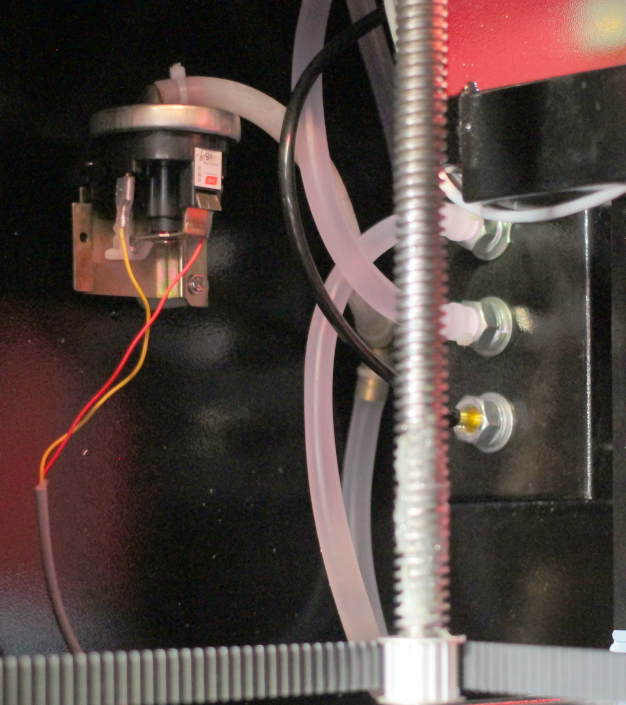
Hmm. Your setup looks like it might use the same sensor as my chinese red & black.
It's interesting to note that "device" appears to be a pressure switch and not a flow switch.
I would expect a proper flow switch to have 2 water hoses connected... a Gozinta and a Gozouta.
My switch only has one hose that's teed off of the inlet so it must be a pressure switch instead and there must be enough restriction in the system somewhere to create the required pressure at whatever flow rate it wants.
If that kink was on your water inlet then you've probably found and cured the problem. If the kink was on the outlet side, then it raises more questions in my mind about what that switch really is and does...
Re: Water Error?
Posted: Sun Mar 24, 2019
by Jeffrey Aley
Jeff Stewart wrote: Sun Mar 24, 2019
So this is a "pressure switch" by your guess?
Very interesting - my experience is limited to the laser that I have, and I have a flow switch which is much smaller and sits inline with the water flow.
Apparently what you have is a pressure switch. LightObject sells replacements if yours ever goes bad:
https://www.lightobject.com/Water-flow- ... -P815.aspx
Re: Water Error?
Posted: Mon Mar 25, 2019
by Mike Henry
FWIW, my Thunder Laser Nova 24 was shipped to me with both Laser 1 and Laser 2 enabled and I was getting a Water Error as soon as I started a run, presumably because the Water Protect interlock logic was looking for flow of water to the 2nd laser tube, which of course didn't exist. Once Laser 2 was disabled from Within RDWorks the Water Protect error was resolved and its been working fine for the past 18 months. Just something else to check for folks in the future that have this problem.